


Home ➜ Shop ➜ Robot Cleaners ➜ Niya Eclipse 35

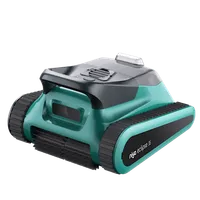
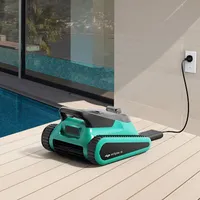
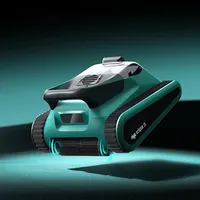
Niya Eclipse 35
Currently unavailable
Quantity
Eco Mode
Use the Maytronics One App to customise the robot's settings, select cleaning modes, including Eco mode schedules and choose your preferred Homing wall. Check the filter and battery status, view cleaning cycles, and troubleshoot issues.
Cordless Freedom
Charge, place, and clean – no cable handling. Designed for full-coverage agility in residential pools.
Full Cleaning Coverage
Active front and rear brushes scrub the floor, walls, and waterline for a thorough clean.
Self-Parking
Automatically parks at the pool edge when a cycle finishes or the battery is low – easy retrieval every time.
DIY-Replaceable Battery
Service at home for convenient, cost-effective maintenance.
Fast Charging & Long Runtime
About 3.5 hours to recharge; up to 2.5 hours of cordless cleaning per run.
Smart & Practical Design
Bluetooth (updates only), lightweight 8.7 kg body, optimised for pools up to 10 m in length.
Cleaning Mode Customisation
Choose from Eco, Standard, Floor-only, or Wall-only modes – including Eco Mode, which keeps your pool tidy all week with multiple short floor cycles on one charge.
Triple Brushless Motor System
Dual-drive motors for agile movement plus a dedicated suction motor for strong debris pickup.
Super-Charged Cleaning. Complete Control.
The Niya Eclipse 35 makes pool care simple and stress-free. Fully cordless and powered by smart sonar navigation, it scans your pool to choose the most efficient cleaning path – giving you full coverage with minimal energy use.
Driven by a triple brushless motor system and active front & rear brushes, Eclipse 35 tackles floors, walls, and the waterline for crystal-clear results. When the cycle ends or the battery runs low, it self-parks at the pool edge for quick lift-out.
Sun Ledge Cleaning
The Dolphin robot is able to clean sun-tanning ledges as shallow as 30cm.
FAQ
What are the optimal water conditions for using my Niya robot?
For best performance, maintain water temperature between 5–35°C, pH between 7.0–7.8, chlorine up to 4 PPM, and salinity up to 5000 PPM.
How do I insert and remove my Niya from the pool?
-Charge the robot fully and press the power button to start.
-Place it gently in the pool and let it begin cleaning.
-When finished, use the hook to guide it to the surface and lift it out by hand.
-Press and hold the power button to turn it off.
Can I swim while Niya is cleaning the pool?
It’s best to wait until the cleaning cycle is complete before swimming. Once finished, remove the robot from the pool and rinse it with clean water.
What does it mean when the cleaner lights up with a purple LED indicator?
The purple LED indicator means the cleaner is stuck. Remove the cleaner from the water, and once the blue LED starts flashing, place it back into the pool to continue the cleaning process.
Why does the cleaner automatically switch off after a few hours of charging?
The device automatically shuts off about 10 minutes after reaching a full charge to protect the battery and extend its lifespan.
My Niya isn’t charging or shows an error – what should I do?
My Niya isn’t charging or shows an error – whEnsure the robot is turned off and clear of debris. Try another power outlet, check that the charger and port are dry, and allow a full 3-hour charge. If the issue persists, please contact us.at should I do?
Why is the robot not cleaning effectively?
If the pool is heavily soiled, the robot may quickly collect a large amount of debris. Check and clean the filter basket to restore full performance.
Why can't the cleaner clean the wall or waterline?
If the filter basket is full, suction strength may decrease, preventing the cleaner from climbing or scrubbing effectively. Empty and rinse the filter before restarting the robot.
Why can’t the cleaner climb the wall?
The most common cause is debris buildup in the filter basket or impeller area. First, remove and clean the basket. If the issue persists, clean the impeller following the steps below.
1. Turn off the robot by pressing and holding the button until the voice says "Goodbye."
2. Ensure the metallic out-of-water sensors are completely dry using a towel or tissue.
3. Remove the two screws securing the impeller cover.
4. Carefully remove debris from the impeller area with a tweezer or similar tool.
5. Reinstall the cover and screws securely before restarting the robot.
How should I store my Niya robot during the off-season?
Empty all water and let the robot dry for two days. Clean and dry the filter basket, then store the robot indoors away from sunlight, rain, or frost at 0–40°C. Recharge every three months to protect battery health.
Where can I find the serial number?
The serial number label is located on the bottom of the robot. It can also be found in the brochure inside the box. Use the last 10 digits when registering your warranty.
What if I’m not satisfied with my purchase?
Shop with confidence. Every cleaner is covered by our 30-day satisfaction guarantee – you have 30 days to return or exchange it for any reason. Read the full policy.

Podeidon Pools CQ can build your new family swimming pool anywhere in Central Queensland. We pride ourselves on build quality and value when working with you on your pool project.
Why Choose Us?
Highly Experienced
Fully Licensed & Insured
Catered To All Budgets
Free Quote & Onsite Consult
Resources
North Rockhampton
Queensland 4701
ABN 93 636 725 810
QBCC 15434397
Copyright 2025 - Poseidon Pools CQ